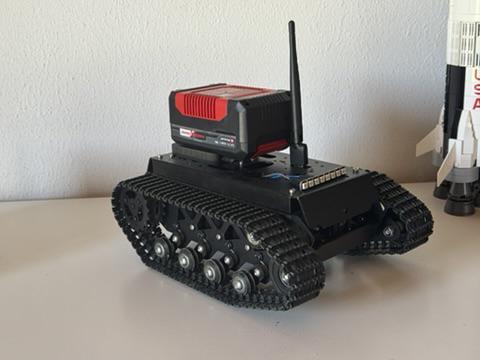
Hugo3 is the latest evolution in my series of robotic rovers. It is a tracked robot built on an AliExpress chassis and powered by a Raspberry Pi 5 (8GB). A key feature is its power supply: by using a standard Einhell battery, the power management is kept simple and reliable.
The rover is practically equipped with an integrated servo controller managing its mechanical components, while two cameras (front and rear) provide a clear view of the surroundings. Both cameras are mounted on gimbals and can be panned left and right. The entire system is controlled via a native Swift Universal App, designed to run on macOS, iOS, and tvOS.
System Architecture
The system is designed as a distributed architecture. A central MQTT broker acts as the nervous system through which all commands and video data flow.
          +---------------------------------------+
          |       HUGO3 ROVER (Raspberry Pi 5)    |
          |  [Dual Cams] --> [H.264 Encoder]      |
          |                      |                |
          |  [I2C Drivers] < [Kotlin Client]      |
          +----------------------^-------|--------+
                                 |       |
                 Control Commands|       | Video & Telemetry
                                 |       |
          +----------------------|-------v--------+
          |         INFRASTRUCTURE                |
          |      [Mosquitto MQTT Broker]          |
          +----------------------^-------|--------+
                                 |       |
                 Control Commands|       | Video & Telemetry
                                 |       |
          +----------------------|-------v--------+
          |          CONTROLLER (Apple)           |
          |  [Input] --> [Swift App]              |
          |                  |                    |
          |          [VideoToolbox Decoder]       |
          +---------------------------------------+
The MQTT Protocol
Hugo3 uses a strict JSON protocol for control and telemetry, along with binary payloads for video. Communication occurs over the following topics:
1. Control (hugo/control)
Direction: Controller → Rover
Sent every 80ms to control motors and servos. Values are normalized to [-100.0..100.0].
{
  "leftDrive": 50.0,
  "rightDrive": 50.0,
  "cameraFront": 10.0,
  "cameraBack": -5.0,
  "light": true
}
2. Heartbeat (hugo/controllerheartbeat)
Direction: Controller → Rover An empty object sent every second. If missing for more than 2 seconds, the rover stops all motors as a safety measure.
{}
3. Control State (hugo/controlstate)
Direction: Rover → Controller The rover reports back the actual status of actuators whenever values change.
{
  "leftDrive": 50.0,
  "rightDrive": 50.0,
  "cameraFront": 10.0,
  "cameraBack": -5.0,
  "light": true
}
4. Telemetry (hugo/systemstate)
Direction: Rover → Controller Sent every 2 seconds to monitor system health.
{
  "linkQuality": 58,
  "signalLevel": -42,
  "cpuTemp": 45.5
}
5. Video Stream (hugo/video & hugo/videoBack)
Direction: Rover → Controller
Raw binary data (H.264 NALUs). Packets containing SPS/PPS/IDR information are marked as retained.
Payload: [00 00 00 01 67 42 ...] (Binary data)
Video Pipeline: NALU-over-MQTT
To achieve the lowest possible latency, we bypass classic container formats. The Rover reads the H.264 stream directly from the encoder and splits it at the start codes (00 00 01).
- SPS/PPS Retention: Configuration packets (SPS/PPS) are stored as
retainedmessages on the broker. This allows a client to join the stream at any time and start decoding immediately. - AVCC Conversion: Since Apple’s VideoToolbox expects NALUs in AVCC format (length-prefix instead of start codes), the Swift controller converts the packets on-the-fly.
[!IMPORTANT] Cooling: The Raspberry Pi 5 quickly exceeds 80°C when encoding two parallel 1080p streams. An Active Cooler is therefore mandatory.
Hardware & Bill of Materials (BOM)
| Component | Description |
|---|---|
| Compute Unit | Raspberry Pi 5 (8GB) |
| Motor Driver | Waveshare uHAT (I2C Adr: 0x40) |
| Servo Driver | Waveshare HAT (I2C Adr: 0x41) |
| Cameras | 2x Raspberry Pi Camera Module 2 (NoIR) |
| Power Supply | 5A Step-Down Regulator (for 2S/3S LiPo) |
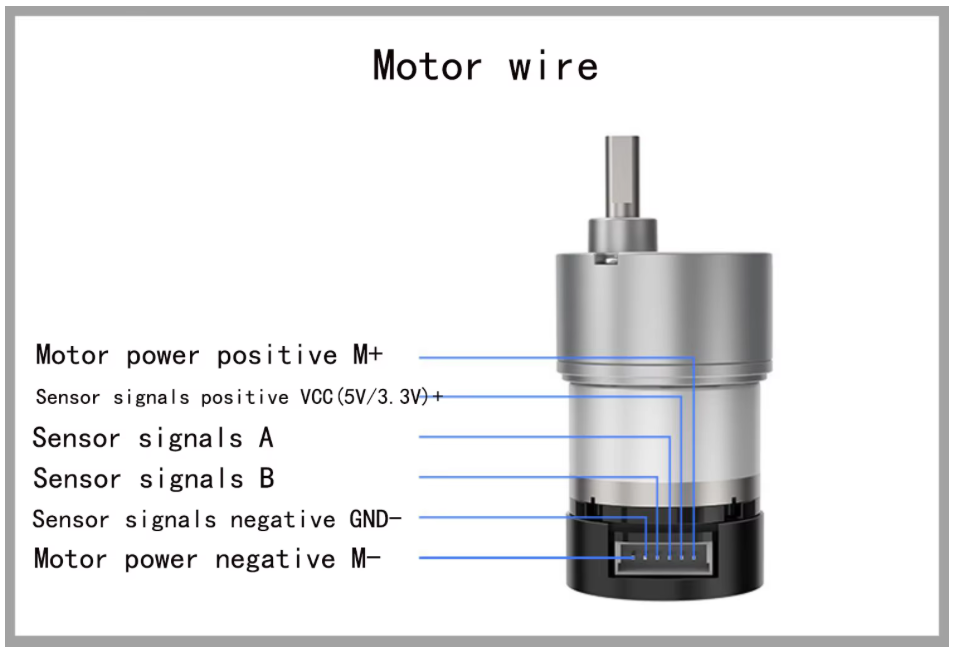 Motor driver pinning diagram
Control & Steering
Thanks to the integration of Apple’s GameController framework, driving feels almost like a video game. Beyond the joysticks for movement and camera pan, the shoulder buttons can lock constant speeds for precise maneuvers.
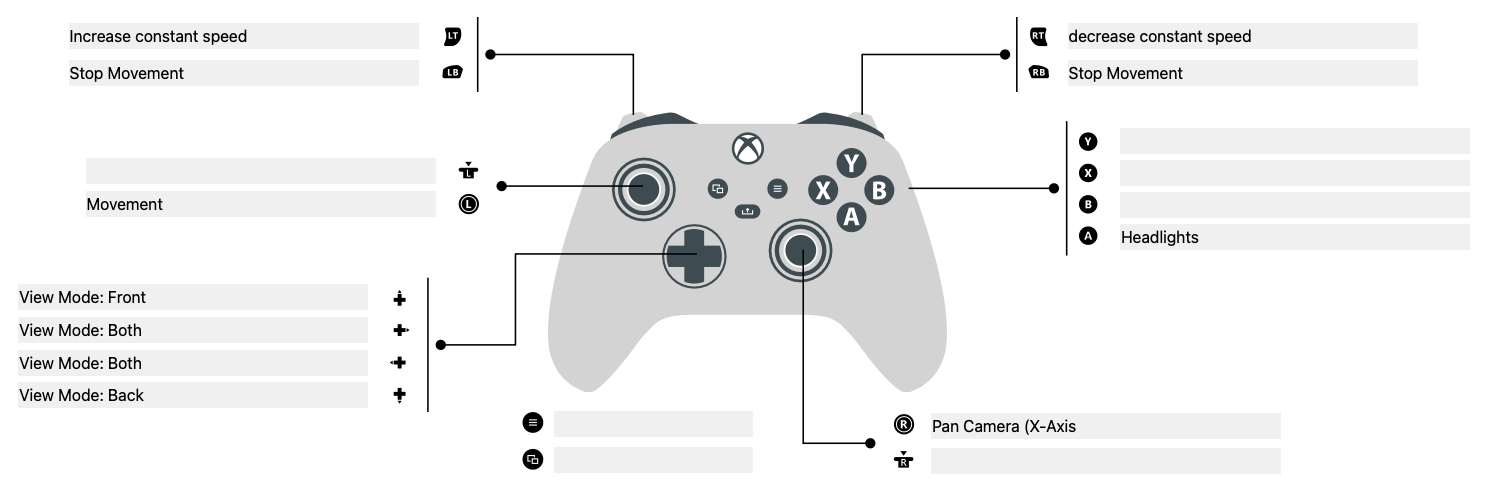 Controller mapping for the Swift app