Neumann is out: Download on the App Store
For the last months I have been building a game called Neumann. You play a human mind, reconstructed and running aboard an interstellar probe. Something went wrong when the mind was copied, and the ship’s caretaker system, the Nanny, keeps you stable by running you inside a simulated human life. Your only link to the ship is a phone inside that simulation.
The twist: that simulated life is your real life, and the phone in your hand is that phone. When a scan takes three hours, you put the phone away and live. The waiting is not friction; it is the fiction. This post is about how it is made: the idea, the data, the pictures, the physics, and the tools I built to write a story on top of all of it.
The idea: the known universe, in real time
I have had the idea for a long time, rolling around in my head. Popping back into my mind with weird timing, under the shower, when reading sci-fi, when walking the child to school.
The starting point was a simple question: what would it actually be like to fly to the stars from the perspective of being on a ship? Not in a warp-drive way, but with the physics we know. Without faster-than-light travel. The answer is relativity. A ship that accelerates hard and long gets close to the speed of light, and then time aboard runs slower than time at home. A trip of twelve light years can take a day aboard while twelve years pass on Earth. That is not a game mechanic I invented; it is what happens. Neumann is built around it:
- Wall-clock time is ship time, one to one. If the probe travels for a day, you wait a day.
- Every trip is a dilation flight: accelerate, turn around halfway, brake. Leaving the Solar System takes about two hours of ship time, Alpha Centauri about fourteen. Meanwhile, Terra’s calendar runs on for years.
- The game is a pure function of your save and the clock. Close the app, come back tomorrow, and the probe is where physics says it must be.
- There must still be a sense of distance: In reality, when you could actually accelerate indefinitely, then every distance in the known universe shrinks to a couple of days. In the game, travelling to Sagittarius A* must take longer than to Alpha Centauri.
One thing to solve: Acceleration. Getting to high speeds and close to light takes time or high acceleration. 2g is manageable for people for short periods of time. 500000g renders the people pretty flat against the back wall. So we need to get rid of the body and travel with the mind alone. The sense of distance is kept by a plot device: We cannot exceed a certain speed due to interstellar matter hammering the front shield. This limits the maximum speed and allows for longer travel times.
A real universe, from catalogues
I always liked those star catalogues available online, so I wanted to build the game around them from the beginning:
- AT-HYG (built from Gaia DR3, Hipparcos and Tycho-2): about 2.5 million stars, with distances, colours and motions.
- The NASA Exoplanet Archive: about 6,000 known planets around 4,800 stars.
- JPL: the Solar System’s planets and 46 moons, at their real positions today.
A Python pipeline merges these sources, cross-links their IDs, groups stars into systems and writes one database the game ships with. Yes, all the data ships bundled with the App. What the catalogues do not know (the planets of stars nobody has searched, a moon here, a ring there) is filled in by rules: deterministic, seeded by each star’s ID, so every player sees the same universe and the same star always has the same worlds. And as these are rules, written in code, they do not take space in the database.
Real data is messy, and that is part of the fun. A recent example: two red dwarfs that orbit each other a few astronomical units apart had separate parallax measurements, which put one of them 9,200 AU behind the other. The game drew a border around that “system” so wide that the probe could not scan at it. The fix went into the catalogue rules: no bound pair of stars is much deeper than it is wide.
I did not come up with all of this though. I had my best agents assigned to the task of helping me create the database. This is another fun part: all of this would be doable by my own but here I deliberately chose the route of mixing agentic coding with me reviewing the code to learn. This project is about learning how to set up such a project, how to solve story telling, how to solve databases. I had the agents give me proposals, discussed with them and then build them for me.
Pixel art, so every world has a picture
With millions of stars and thousands of planets, hand-drawn art was never an option. 3D rendering everything was too expensive. I did not want to use a fancy 3D engine, I want to understand from scratch, so I took the most beautiful route one can take for games (very subjective): Everything in Neumann is pixel art, generated from data:
- A star’s portrait comes from its temperature and radius.
- A planet’s picture comes from its class, temperature and atmosphere.
- The probe and its instruments are solid models, defined as code, traced into pixels and painted section by section.
Pixel art keeps it simple and coherent. Every world gets its own picture, and none of them had to be drawn.
Accurate physics
The rule for the code is: no faster-than-light travel, and the physics must be right. The formulas are written down in the project’s architecture document, next to the code that uses them:
- Constant proper acceleration, flip and burn, with in-system speed limits (dust hurts at those speeds).
- Time dilation: your clock against Terra’s.
- Aberration: at high speed the stars crowd into the direction of travel.
- Doppler shift and beaming: the stars ahead turn blue and bright, the ones behind red and dim.
There is exactly one deliberate exception, and it is part of the story: the FTL-Ping, the ship’s quantum entanglement array, which hears a whole star system at once. Everything else waits for light. Why the FTL ping you might ask? Well, this is a story device. I needed to show the user where they can find something in a reasonable amount of time. Without any knowledge about a star system, just looking at it with a telescope is possible but takes a lot of real time. So I needed to at least provide echoes to search for.
The platform is the stage: a story to be told
All of this is the stage. What I actually want to do is tell a story on it. The Nanny tried to keep humankind alive on Terra, Venus and Mars, and failed. The minds it was meant to send to the stars kept coming apart; yours is the first that holds. So the two of you go out, scan, and write down what you find. And out there, someone has been waiting.
The story is written as script files: who speaks, in which mood, what the player can answer, and what the story waits for in the game (“arrived at Barnard’s Star”, “studied this planet up close”, “a ping finished”). The Nanny’s lines are canon, but on devices with Apple Intelligence the on-device model may phrase some of them in its own words, so a repeated scene never sounds quite the same. This sometimes works better, sometimes not so much. It heavily depends on the local model and playing with the prompts only helps so much. Also AI based responses are clearly marked so that the user is always aware of them.

The tools
A game built on real data and a branching story needs tools. They all run on the Mac only, in English, and they read exactly the same data and code the game uses, so what they show is what the game does.
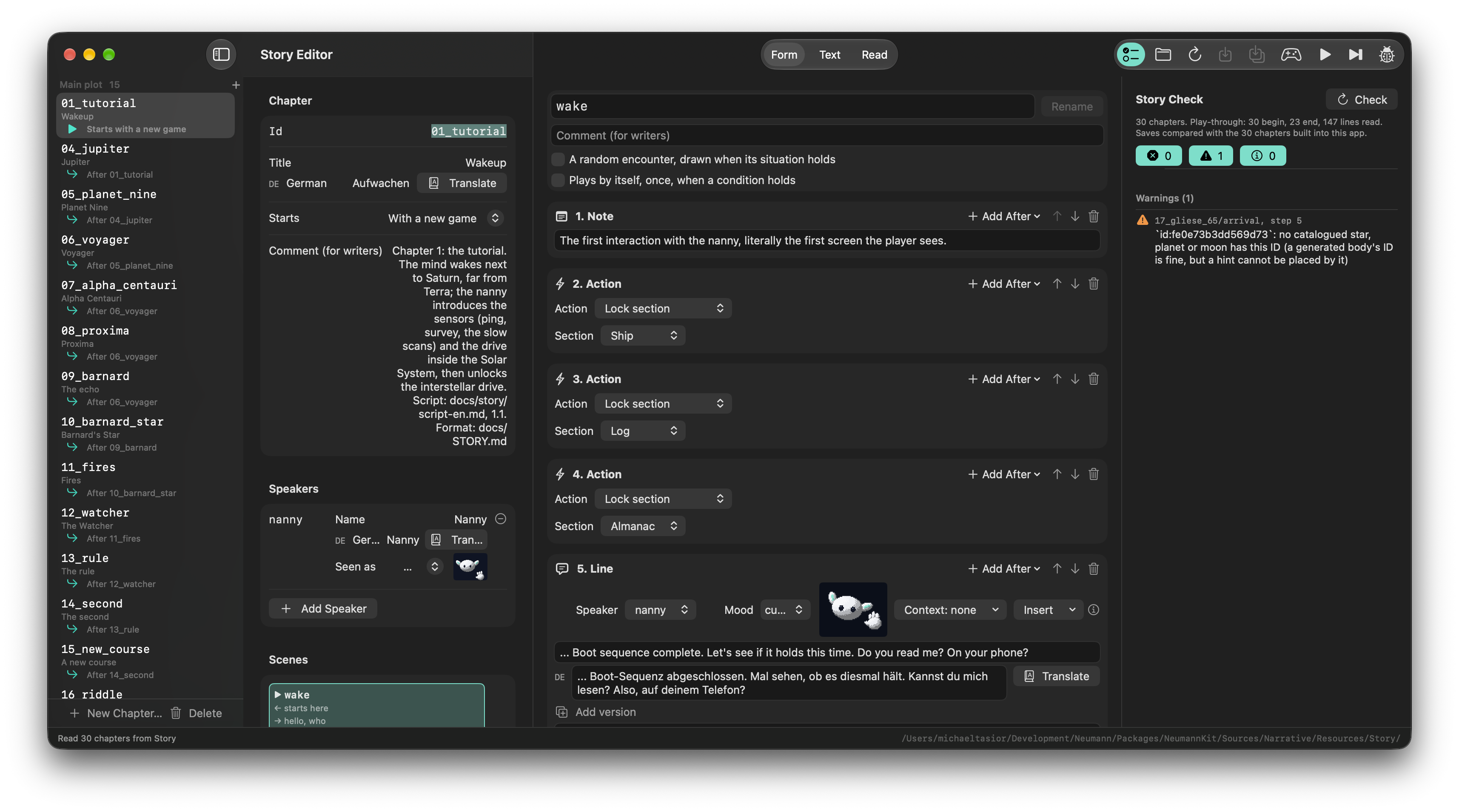
Universe Inspector
Browse the catalogue: any star, its system, its planets and moons, where each value came from (observed, derived or generated), and an orbit map true to scale with a time slider. It contains all the story objects that might or might not take part in the story and delivers the reference for the story author (also me) where to go.
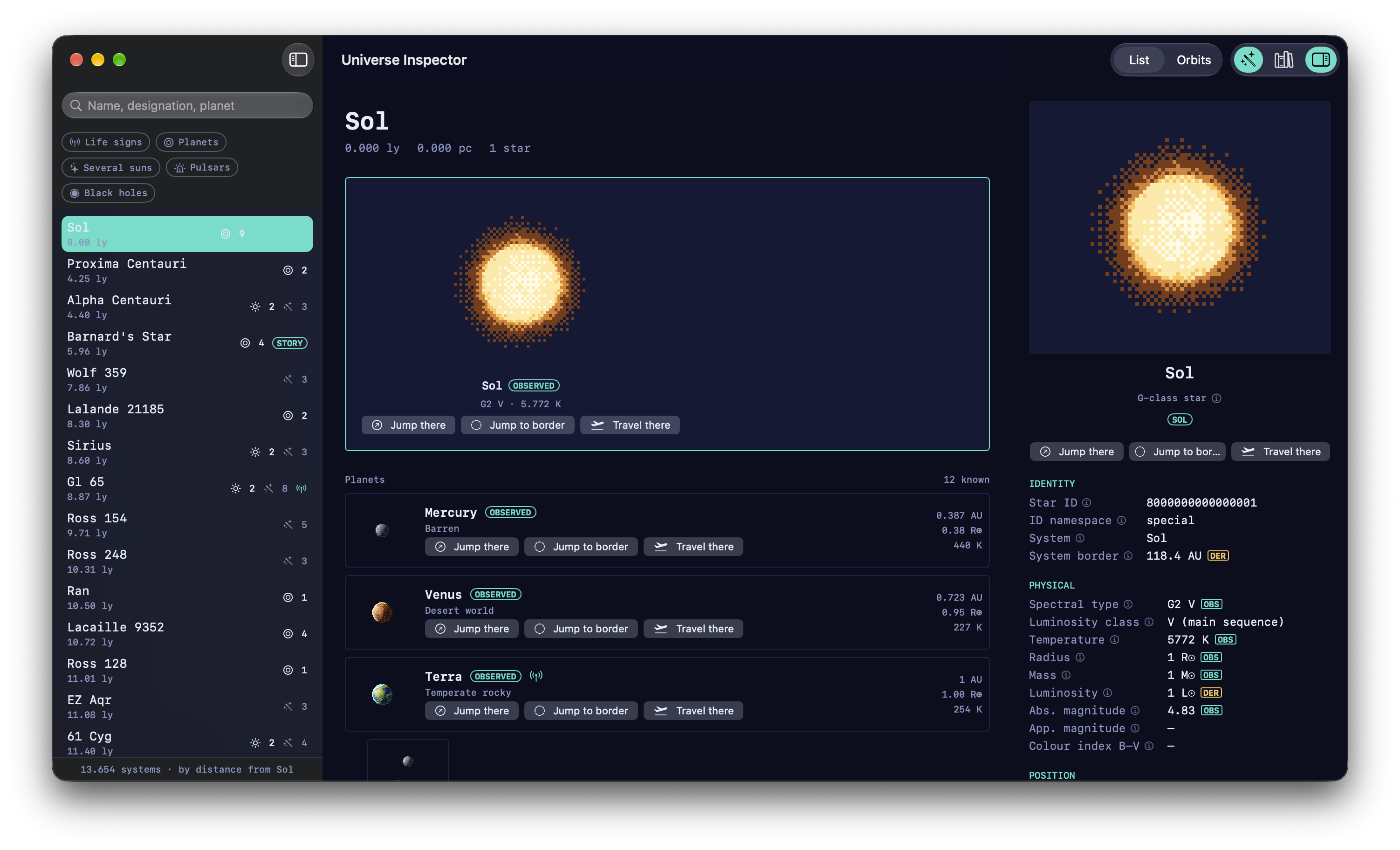
Asset Viewer
Every generated asset in one place: the probe and its instruments as 3-D models beside their pixel sprites, generators for stars and planets with sliders, and the characters in every mood.
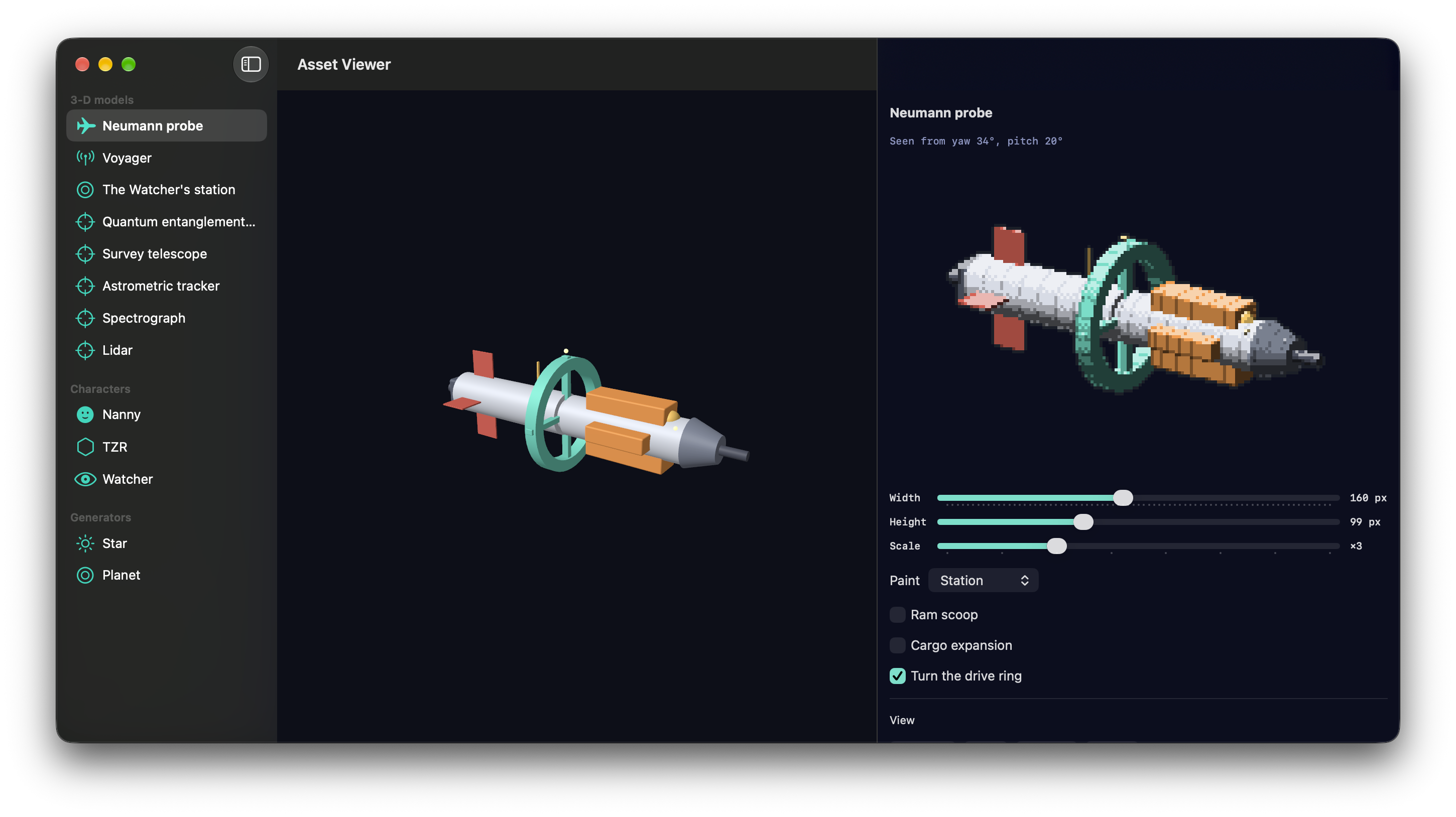
Story Editor
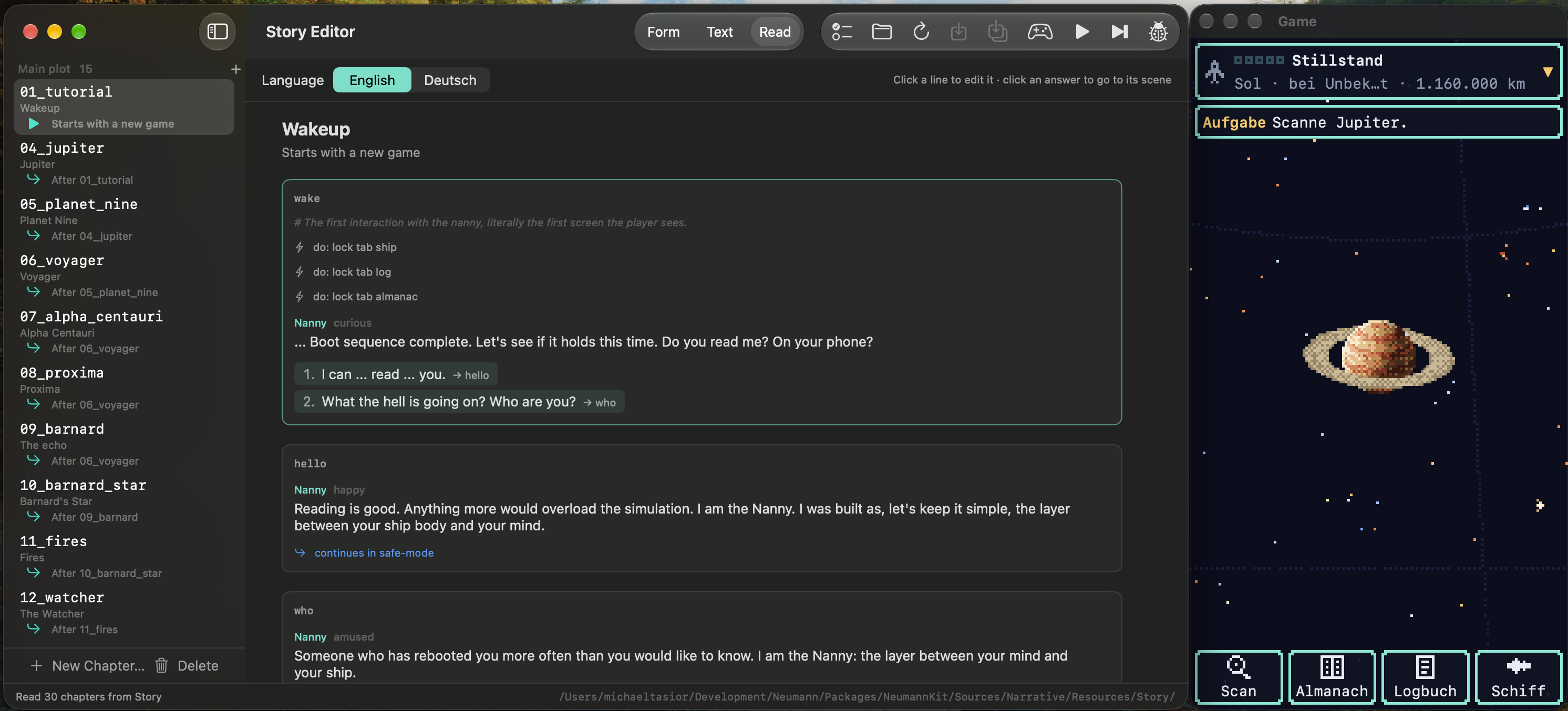
The story’s chapters, sorted into main plot, recurring scenes, side stories and update notes. Each chapter is shown as a flow diagram of its scenes; lines are edited in place in English and German, with on-device translation. Translation because I usually write in English. Pressing the local translation button and then updating the result is quite quick, albeit not perfect. A Story Check plays the whole story through on every change and reports anything that would break in the game: a quest nobody completes, a scene nothing leads to, a wait no player can get past.
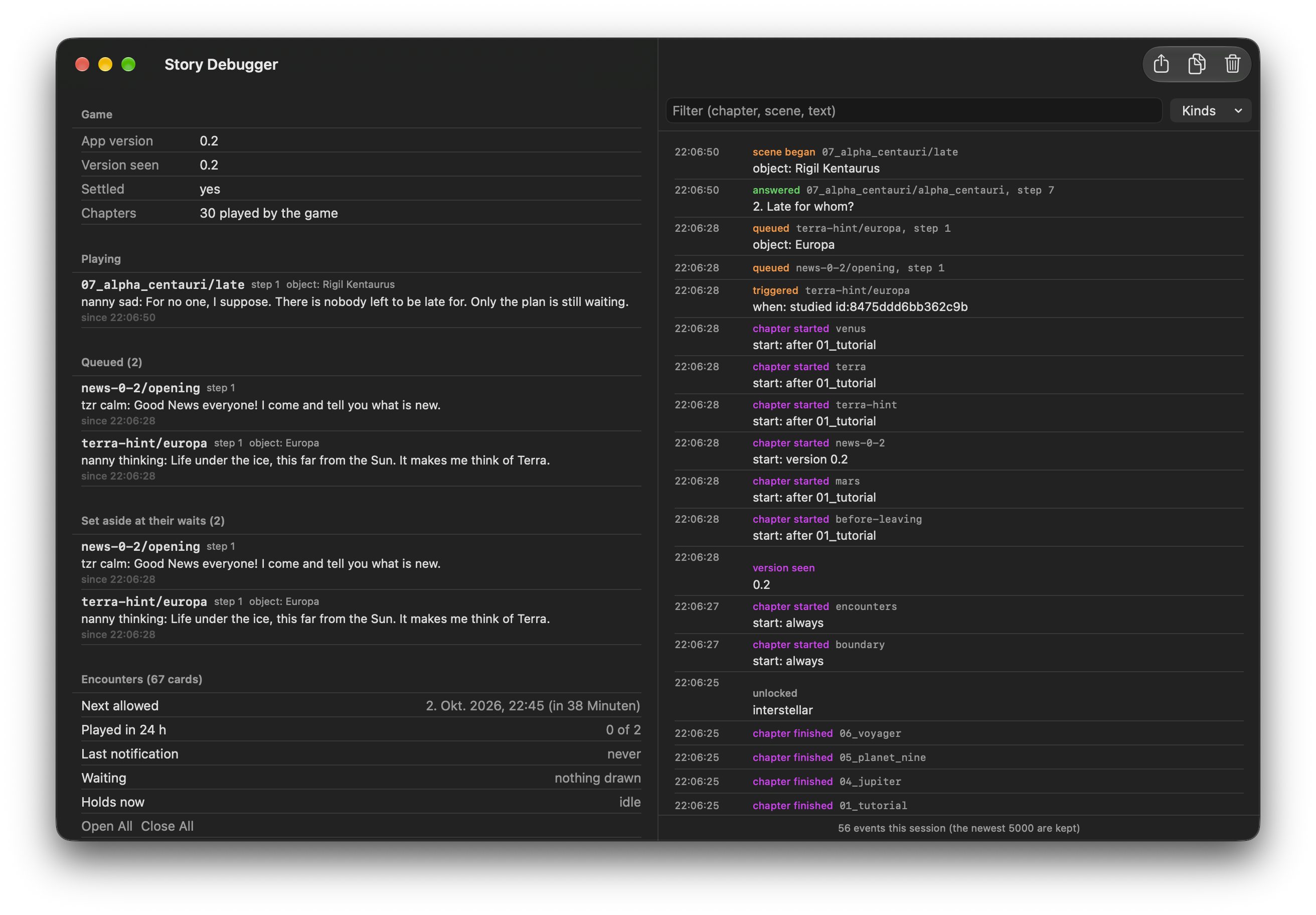
Story Debugger
The running game’s story, live: which scene plays, what each waiting scene waits for and whether that holds right now, every chapter’s state, and a history of everything that happened. Export as JSON for a bug report.
Text Editor
Every text the game shows, in English and German side by side. Not using Xcode here is a deliberate choice: My editor enables editing English and German side by side. Again with the local translation enabled.

Catalogue build
The catalogue build, which turns the source catalogues into the game’s database is actually a separate tool, built in python, simply because it is the simplest and shortest solution to do so. I tried porting (or having it ported to) Swift but this resulted in a rather complex solution. I do not like the Python syntax very much but in this case it is the better solution.
An AI that plays the game
The Mac app also runs a small server for AI assistants (MCP). A connected AI can read the game as the player knows it and play it like a player: open sections, set courses, scan, answer the Nanny. It is a surprisingly good tester.
An AI that plays the nanny
One of the original ideas for this game was to actually rely on the onboard models to really drive the Nanny character. You as the player would interact with it through a pure text interface and play the game that way. It would generate notifications on the fly and ping you once it was done. This does not work as well as I would have liked.
Integrating an external LLM is a possibility but as the game is intended to be free to play, I chose not to do this for now. Maybe later or with an interface for the player to bring their own key.
To experience this anyways I could integrate an LLM just like any other harness but I chose the vice versa route: The MCP server offers a means for the connected AI to play the Nanny. There are detailed instructions how to behave and what to do, so it can both play the game like a player but also be the nanny, executing the same actions. This turned out to be quite fun and close to my original intent for the game but this is no viable approach for the current generation of onboard models. So I currently keep this tied to the Mac version of the game and only for my own pleasure.
The game on the Mac: testing and replaying the story
Neumann is an iPhone and iPad game, but the same game runs in a window on the Mac. That is where most of the testing happens, because the Mac version is wired to the tools:
- Use in Game makes the running game play the story as it is being edited, saved or not.
- Play Scene starts any scene right away.
- Play from here brings the story to the start of any chapter, as if everything before it had been played, and lets me step through the story in order.
- The development menu turns trips into ten seconds and scans into two, actually flown and actually scanned, so a story that takes weeks in real time can be played in an evening.
What’s next
It is a work in progress. I am currently writing the story, inventing characters, integrating pop culture references and trying to learn as much as possible while having a massive amount of fun in the process. Also, the name is Neumann. A von Neumann probe concept lives from the fact that it can replicate itself. Still not sure how to bring this into the game tbh.
Play Neumann: Download on the App Store
More about the game: neumann.tasior.de