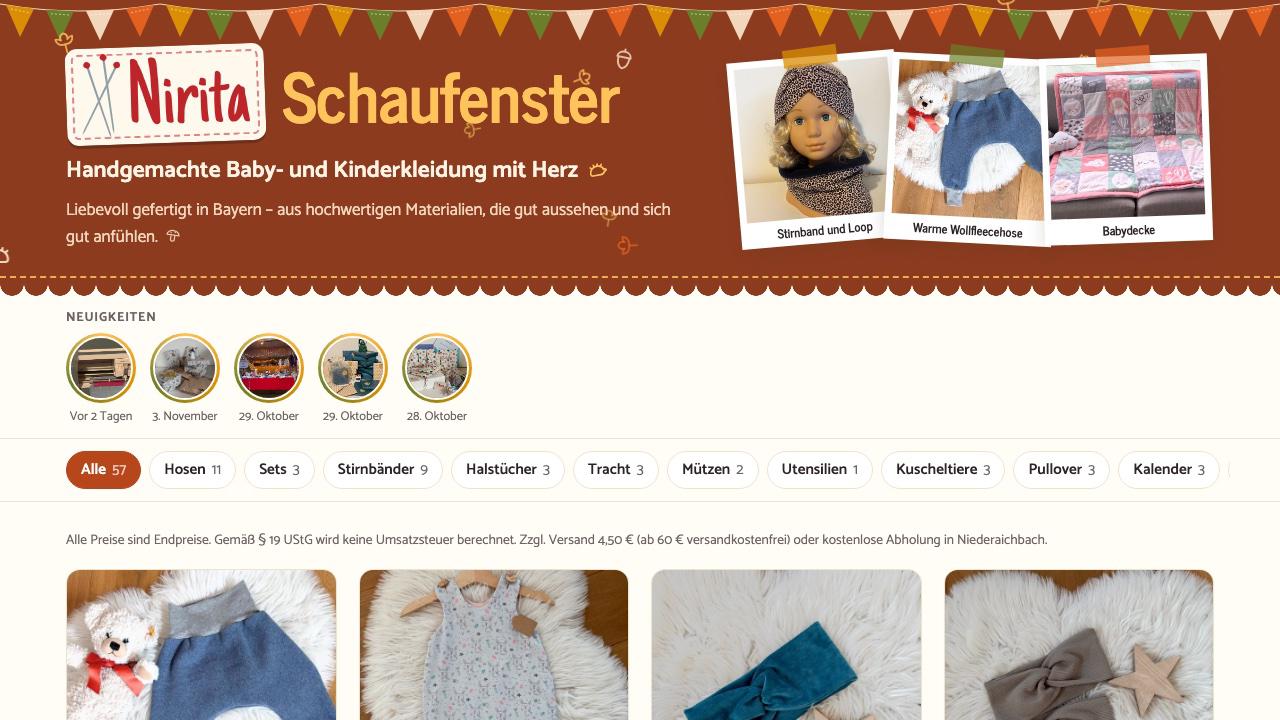
See it live: nirita.de
Nirita is a small sewing business: handmade baby and children’s clothing, made in Bavaria. Trousers, headbands, scarves, cuddly toys, the occasional Tracht. The shop used to live on a website builder. It was time for something that fits better, and I got the job ( I mean, it’s my wife, so…)
The brief was short:
- No shop system. Nothing is sold online. People ask, and the answer comes over WhatsApp, which is where the customers already are.
- Everything from the phone. Take a photo, write two lines, publish. No laptop, no CMS login, no me in the loop.
- It should look like Nirita, not like a template.
The result has three parts: a static website, an app that manages it, and a small backend that writes product texts.
The shop window
The website is called Nirita Schaufenster, the shop window. It is plain HTML, CSS and JavaScript, rendered in the browser from a single content.json: the shop’s texts, the categories and every product with its pictures, sizes, colours and price. Fonts are self-hosted, nothing is loaded from anywhere else, and there is no server-side code at all. It is a folder on a web space.
Every product has an “Anfrage” button with the WhatsApp logo. It opens WhatsApp with a message that already names the product, and the chosen colour if there is a choice. That is the whole checkout.
There is more on the page than products:
- Neuigkeiten (news): a strip of round pictures above the categories. Tapping one opens a full-screen viewer, just like a WhatsApp status. They expire on their own.
- Kurse (courses): sewing courses get their own page with a “Platz anfragen” button, and a calendar feed (
webcal://) that customers can subscribe to.
The app
The real product is the app. It’s a SwiftUI app for iPhone, iPad and Mac, and it owns the website’s content. Its Website tab lists every product. You can edit, hide and delete products there, or add a new one with photos straight from the camera, cropped square in the app.

Publishing goes over SFTP: every change downloads the current content.json from the server, applies the change, uploads the new pictures, then the content, and finally removes pictures nobody uses any more. Downloading first means two devices never overwrite each other. Picture names are never reused, so browsers can cache them forever, while content.json is always fetched fresh.
A few details I like:
- Colours as data. Instead of “Farbe: altrosa” somewhere in the text, products have real colours: a palette of named fabric shades plus custom ones. Shades used on other products are offered again. Old descriptions can be converted with one tap.
- Sizes from 56-62 to 140-146, always shown in the right order.
- The password stays on the device. It’s entered once in the settings and lives in the device’s keychain, not in the code.

Found by search engines
A page that renders from JSON in the browser is not great for search engines, or for link previews in WhatsApp and Instagram. So with every change the app also writes one static HTML page per product. Each page has the title, the description, Open Graph tags for the previews, schema.org product data, and the product itself already rendered. The app also writes a sitemap.xml.
A hash per page means only the pages that actually changed are uploaded. Pages of hidden or deleted products are removed. The site is registered with Google Search Console and Bing, and since the app keeps the sitemap current, there is nothing to maintain there.
Themes for the seasons
The shop changes with the year: Standard, Frühling, Ostern, Sommer, Herbst, Halloween, Winter, Weihnachten. A theme changes the colours, the bunting along the top, the little doodles (needles, spools, buttons) and puts the logo on a sewn-on label. Some themes bring effects, like a spider and bats for Halloween. Nothing moves if the visitor asked for reduced motion.
Halloween was made by hand. The other six are generated by a Python script from short descriptions of each season. Switching happens in the app: it writes a one-line theme.css that every page loads, so there is no flash of the standard look.
An AI that writes the product texts
Writing a good product description takes time, and the website already has a voice. So the product editor has a Textvorschlag (text suggestion) button. You write a few words, and a nicely worded description comes back in the tone of the website.
Behind it is a small Kotlin/Ktor backend running in Docker on my home server. It queues the texts and hands them out one at a time. The interesting part is who writes them:
- Claude first. The backend is also an MCP server. A dedicated Claude Code session on my Mac connects to it, takes the next job (the draft, the product facts, and the website’s existing descriptions as tone examples) and submits the text.
- Ollama as fallback. If no Claude session is active, or one doesn’t answer within ten minutes, a local model on the Mac mini writes the text instead.
- Idle costs nothing. The Claude session never polls with the model. When there’s no work, it starts a tiny shell script in the background that long-polls the backend and ends its turn. As soon as a text is waiting, the script exits and wakes the session up.
It’s the same idea as the AI that plays the Nanny in Neumann : the AI sits on the other side of an MCP server instead of being built into the app.
Sharing to Instagram
The shop also lives on Instagram, and posting every product twice by hand is no fun. So every product and every news story has a “Share on Instagram” button. The app writes the caption from the product data: title, description, sizes, colours, a note if the piece is made to order or one of a kind, the link to the product page and a set of hashtags. The caption goes to the clipboard, the picture is loaded from the website into the share sheet, and in Instagram it’s just paste and post.
Why not post directly? Instagram doesn’t let you post to a personal account through its API. A hand-over through the share sheet is two taps more, but it needs no account connection, no tokens and no server.

Tested, too
The backend has JUnit tests that run against a fake Ollama. The app has Swift tests that run against a stub server and a fake SFTP connection: content, pictures, product pages, sitemap, calendar and themes, all without touching the live site. Two opt-in tests do talk to the real server when I want them to.
Visit the shop window: nirita.de